Nervecentre V9.0 Help for Users
Overview of Theatres
Nervecentre Theatres allows you to:
-
View sessions for theatres
-
Book elective procedures into sessions
-
Book and schedule emergency procedures
-
View procedures in recovery
-
Manage theatre sessions
 Overview of Theatres
From Theatres, you can view and manage theatre scheduling.

|
Home |
Your home dashboard. You can customise your home dashboard to show your choice of information. Your home dashboard is available across Nervecentre. |
|
Calendar |
View and manage theatre sessions. |
|
Session |
View and manage a specific theatre session. |
|
Recovery |
View procedures in recovery. |
|
Emergencies |
View and manage emergency procedures. |
|
Patient Detail |
View and edit demographic and clinical information about a patient. |
|
Worklists |
View your worklist. Your worklist shows you lists of items returned by flow metrics. For example, you might have a worklist that lists all the things you need to do. |
|
Manage |
View and edit information about theatre rooms and theatre lists. |
Calendar
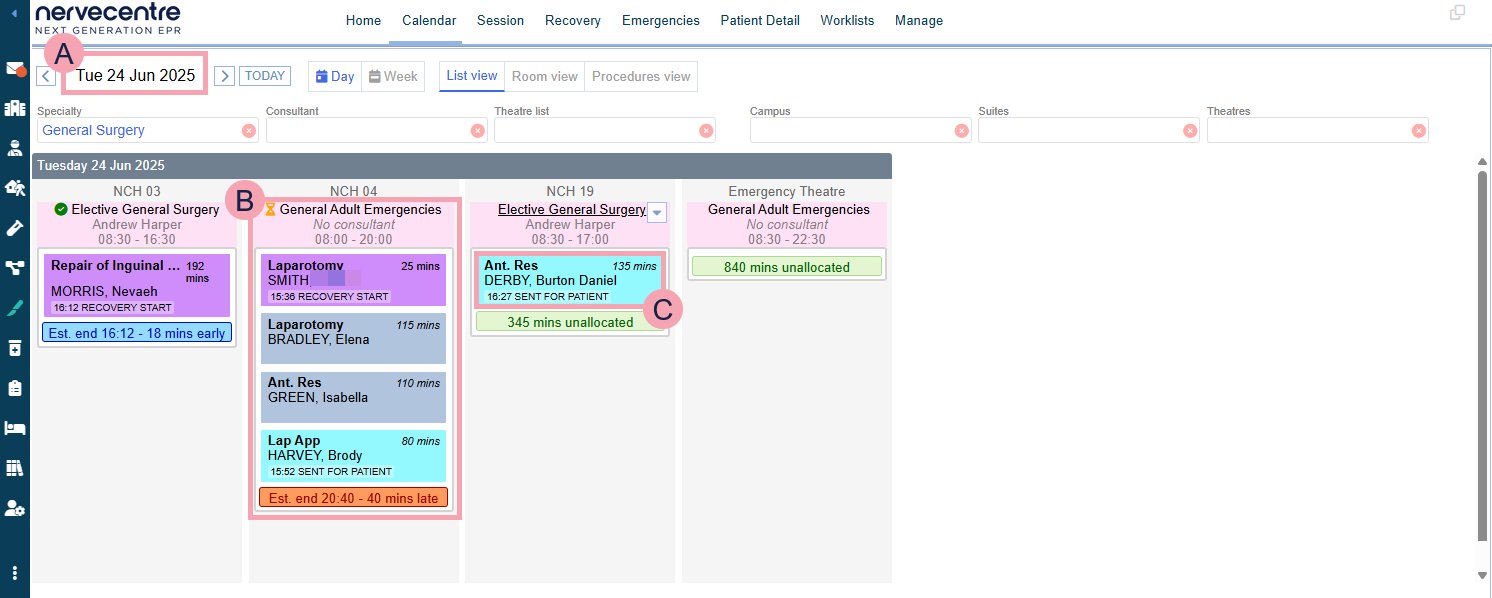
From Theatres > Calendar > List view, you can view a list of procedures in each session, where each session is a column. Sessions are sorted by date, theatre, and start time.
|
|
Select to move forwards or backwards a day or a week. |
|
|
Select to choose a specific date from a calendar. |
|
TODAY |
Select to view today's sessions. |
|
Day |
Select to view sessions on a specific day. |
|
Week |
Select to view sessions on a specific week. |
|
List view |
The current view. |
|
Room view |
Select to switch to room view. |
|
Procedures view |
Select to switch to procedures view. |
|
Specialty |
Select a specialty to view sessions for that specialty. |
|
Consultant |
Only appears if you choose a specialty. Select a consultant to view sessions with that consultant. |
|
Theatre list |
Select one or more theatre lists to view sessions in those theatre lists. |
|
Campus |
Select a campus to view sessions at that campus. |
|
Suites |
Select a theatre suite to view sessions in that theatre suite. |
|
Theatres |
Select one or more theatres to view sessions in those theatres. |
|
|
A session. Above the session is the name of the theatre where the session takes place. From top to bottom, the session displays:
Select the name of the theatre list to view and manage that specific session. |
|
|
Mouseover a session and select to manage that session. |
|
|
A procedure. The colour of the procedure tells you its status.
|


 Session
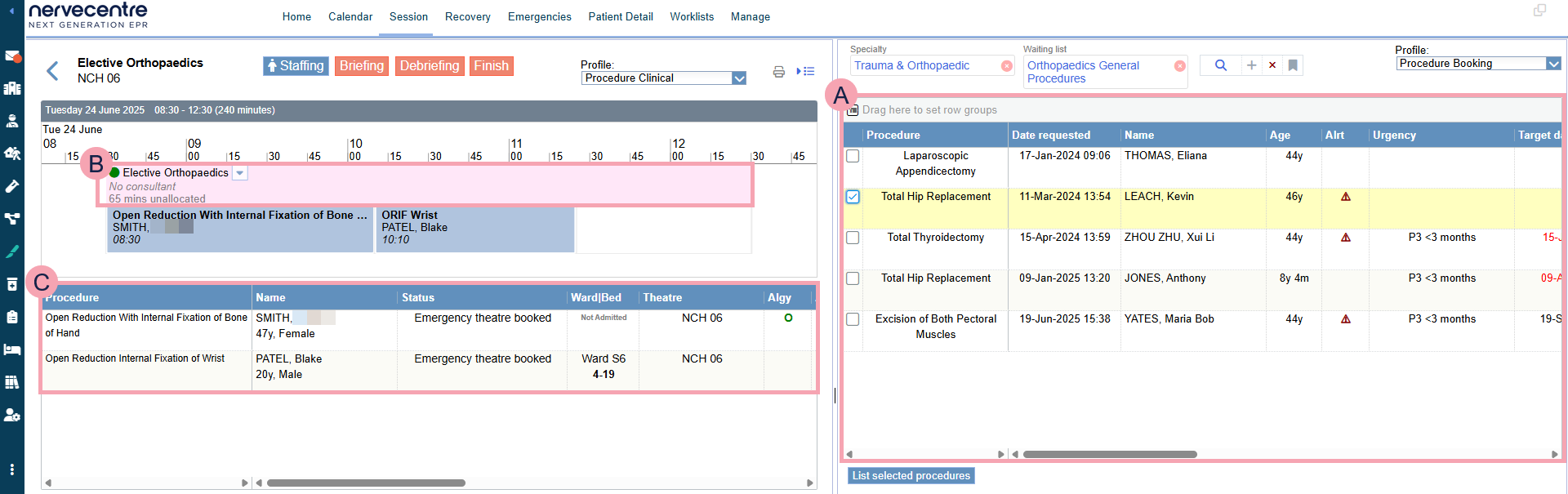
From Theatres > Session, you can manage a specific session.
|
|
Select to return to Calendar. |
|
Staffing |
Select to add and remove staff from the session. |
|
Briefing |
Select to complete the briefing form for the session. If the briefing form isn't complete, this is red. If the briefing form is complete, displays. |
|
Debriefing |
Select to complete the debriefing form for the session. If the debriefing form isn't complete, this is red. If the debriefing form is complete, displays. |
|
Finish |
Select to mark the session as finished. If the session isn't finished, this is red. If the session is finished, displays. |
|
Profile |
Select a clinical note profile to change the information that displays next to the procedure in the session. |
|
|
Select to print a report for the session. |
|
|
Select to show and hide the right panel. |
|
Specialty |
Select a specialty. |
|
Waiting list |
Select a waiting list to view patients on that waiting list for their procedure. |
|
|
Select to clear that search term. |
|
|
Select to search. |
|
+ |
Select to add search criteria. |
|
|
Select to clear all search criteria. |
|
|
Select to save your search and manage saved searches. |
|
Profile |
Select a clinical note profile to change the information that displays next to procedures in a waiting list. |
|
|
A session. From top to bottom, this shows:
|
|
|
Shows procedures in the waiting list that need to be added to a session. You can filter this table. |
|
|
Mouseover a session and select to manage that session. |
|
|
Shows procedures in the selected session. You can filter this table. |
|
List selected procedures |
Select to add the selected procedures to the session. |
Recovery
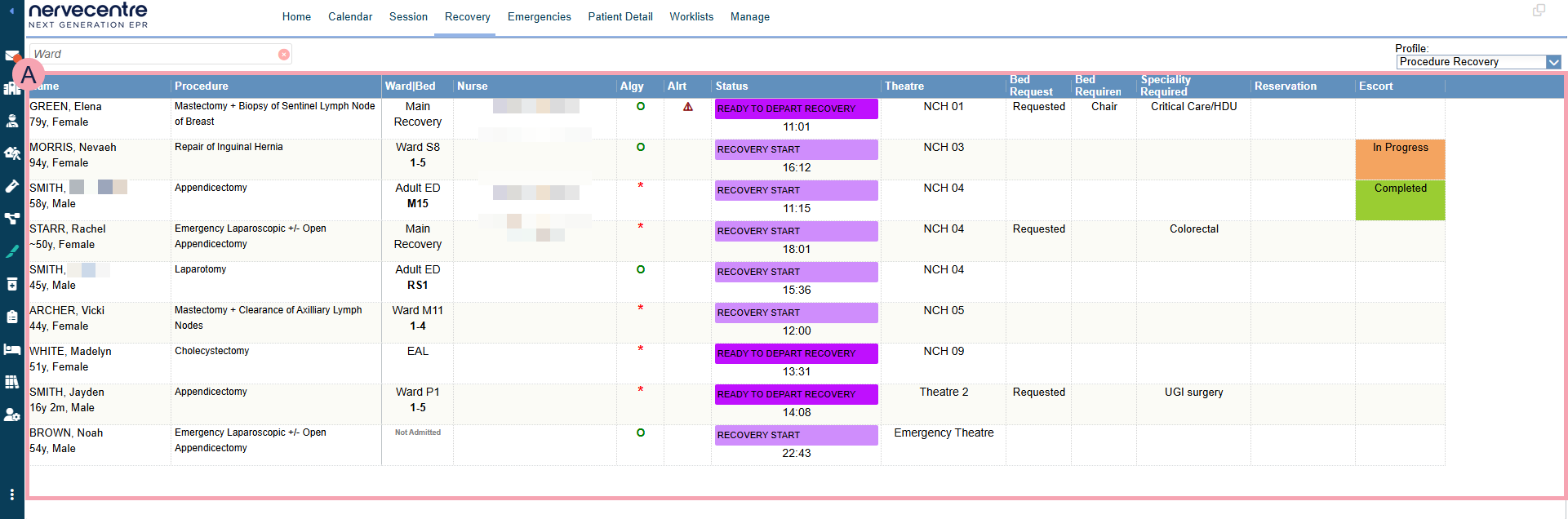
From Theatres > Recovery, you can view procedures that are in the recovery phase.
|
Ward |
Select one or more wards to view patients on those wards with procedures in the recovery phase. |
|
Profile |
Select a clinical note profile to change the information that displays next to each patient. |
|
|
Shows a list of patients with procedures that are in the recovery phase. You can filter this list. |
Emergencies
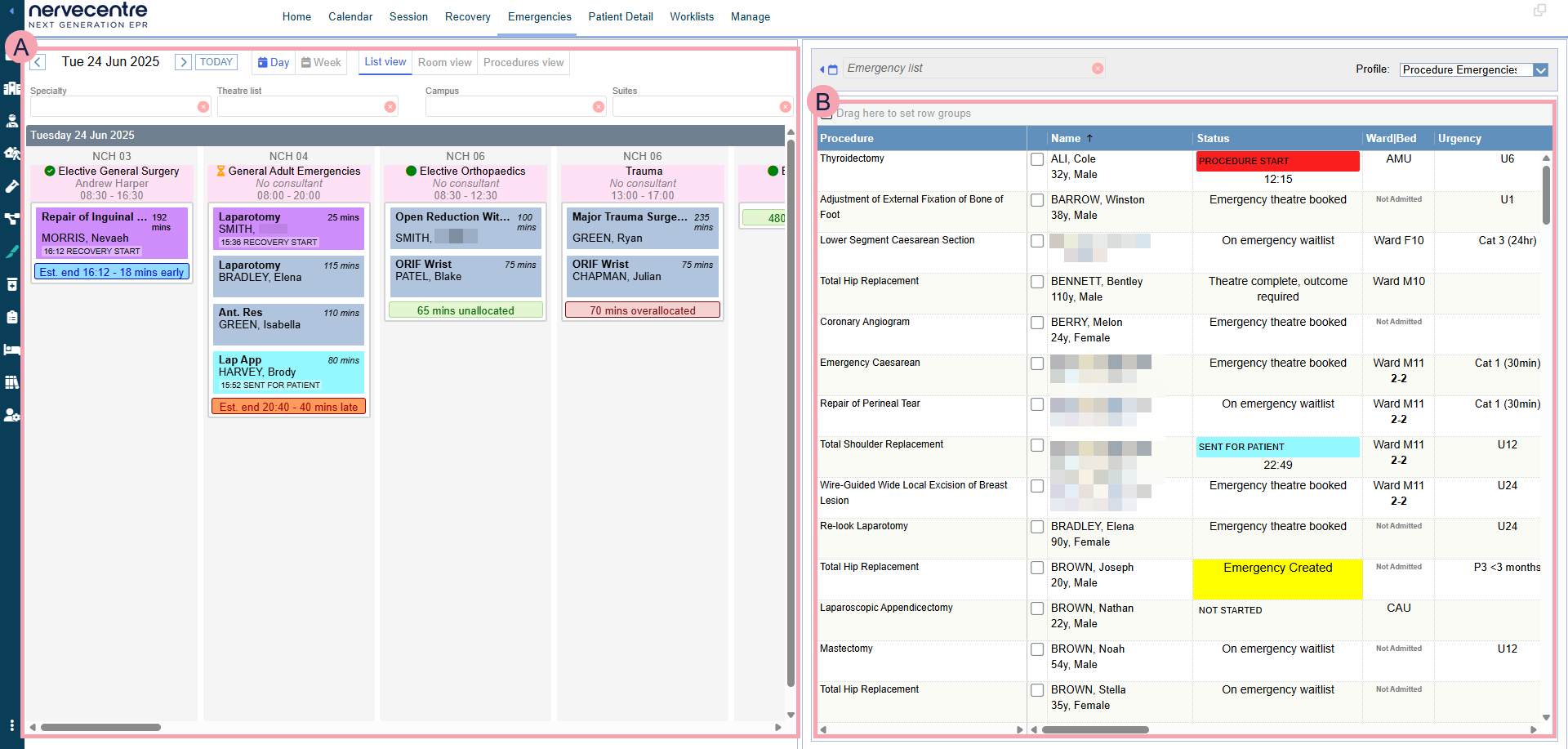
From Theatres > Emergencies, you can view patients who need an emergency procedure, and you can add those procedures to sessions.
|
|
Shows sessions you can add emergency procedures to. This panel is similar to Calendar. |
|
|
Select to show and hide the left panel. |
|
Emergency list |
Select an emergency waiting list to view patients on that list who need emergency procedures. |
|
Profile |
Select a clinical note profile to change the information that displays next to each patient. |
|
|
Shows a list of emergency procedures that need to be added to sessions. You can filter this list. If you filter your list or move columns, Reset Grid displays. Read more about filtering tables Select one or more emergency procedures to add this procedures to sessions. |
Worklists
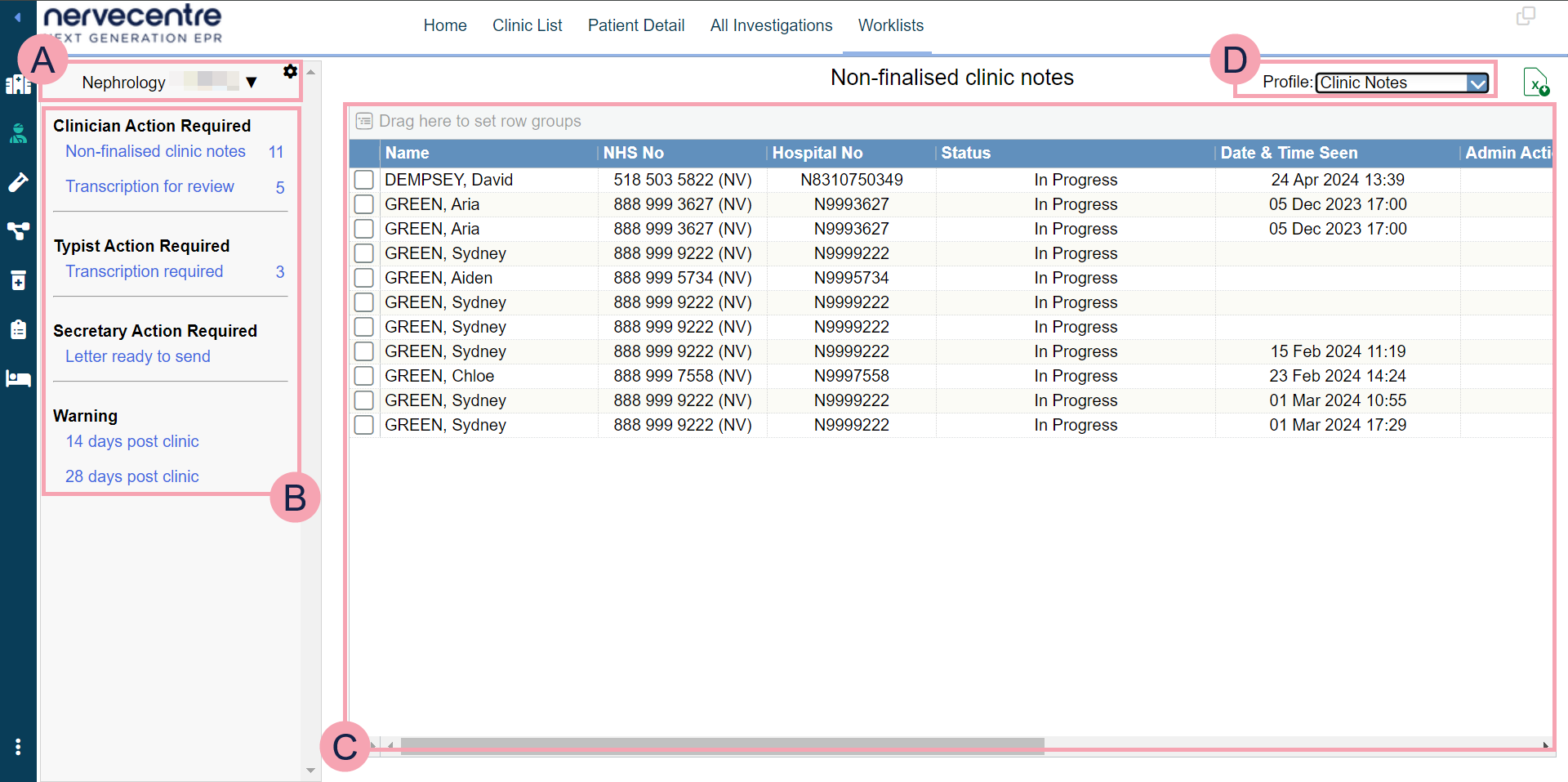
From Worklists, you can view lists of items returned by flow metrics. For example, you might have a worklist that lists all the things you need to do.
|
|
Shows the name of the worklist. Select to choose a worklist to view. Select to:
|
|
|
Shows groups and entries in each group. Next to the name of the entry is the number of items returned by the flow metric. Select the name of an entry to view a list of items. |
|
|
Shows the list of items returned by a flow metric. Double-click on a patient's name to view their patient record. |

|
Select a clinical note profile to change the information that displays in the table. |
|
|
Export the current results to an .xlsx file. |
 Manage
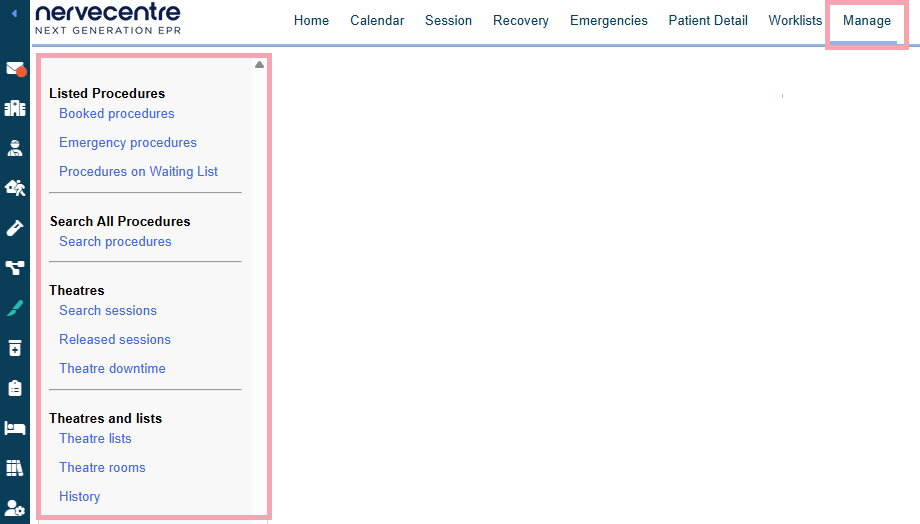
From Theatres > Manage, you can manage theatre lists and rooms, and view relevant information.
|
Booked procedures |
View booked procedures. |
|
Emergency procedures |
View emergency procedures. |
|
Procedures on Waiting List |
View patients on a waiting list for a procedure. Read about viewing patients on a waiting list for a procedure |
|
Search procedures |
Search all procedures. |
|
Search sessions |
Search all sessions. |
|
Released sessions |
View released sessions. |
|
Theatre downtime |
View theatre downtime. |
|
Theatre lists |
Manage sessions for theatre lists. |
|
Theatre rooms |
Manage sessions for theatre rooms. |
|
History |
View the history of changes to a theatre list. |
Did you find this article helpful? Yes No
Sorry about that. Our help is a work in progress and we welcome any feedback.
Why wasn't this helpful? Please select one reason:
Great!
Thanks for taking the time to give us some feedback.