Nervecentre V9.0 Help for Users
Viewing patients on a waiting list for a procedure
You can view a list of patients on a waiting list for a procedure from Theatres > Manage > Procedures on Waiting List.
Viewing patients on a waiting list for a procedure on a mobile
You can't do this on a mobile.
Viewing patients on a waiting list for a procedure on a desktop
 Overview of Manage > Procedures on Waiting List
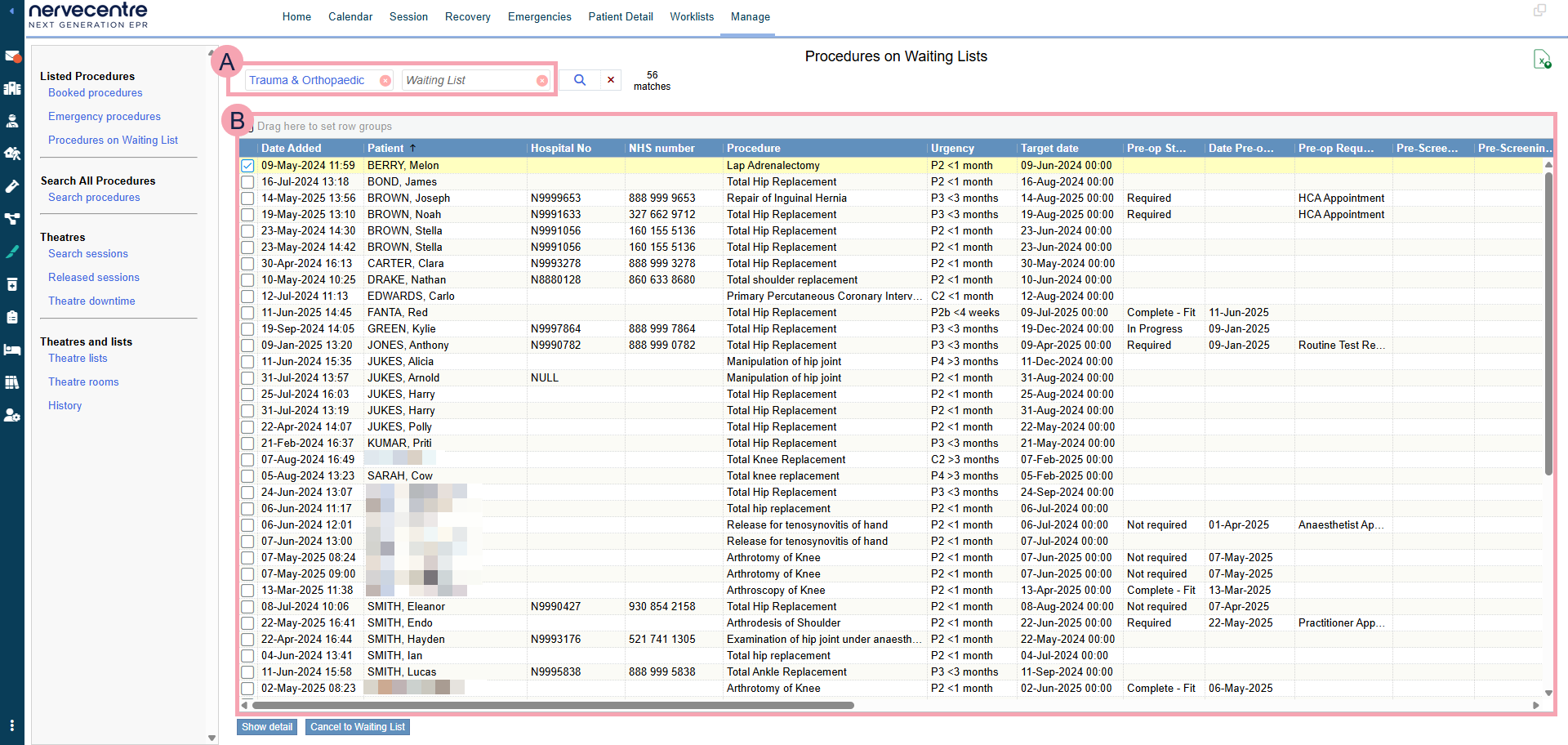
From Theatres > Manage > Procedures on Waiting List, you can view a list of patients on a waiting list for a procedure.
|
|
Here you can select the criteria for your search. To clear one search term, select next to the search term. To clear your whole search, select next to . |
|
|
Select to search. |
|
|
Export the current results to an .xlsx file. |
|
|
Shows the table of data returned by your search. You can filter this table. |
|
Show details |
Select to view details about a procedure. |
|
Cancel to Waiting List |
Select to cancel one or more procedures to a waiting list. |


 Viewing a list of procedures on a waiting list
-
From Theatres > Manage > Procedures on Waiting List, select your search criteria.
Use the table below to choose your search criteria.
Specialty
Select a specialty.
Waiting list
Select a waiting list to view patients on that waiting list.
-
Select .
A table appears.
-
Double-click on a procedure to view that procedure from Procedures.
From the bottom right of the screen, select to view that patient's procedure in another window. This allows you to view the waiting list and a specific patient's procedure at the same time.
Did you find this article helpful? Yes No
Sorry about that. Our help is a work in progress and we welcome any feedback.
Why wasn't this helpful? Please select one reason:
Great!
Thanks for taking the time to give us some feedback.