Nervecentre V9.0 Help for Users
Viewing theatre downtime
You can view theatre downtime from Theatres > Manage > Theatre downtime.
You can add, edit, and remove downtime from Theatres > Calendar > Room view.
Viewing theatre downtime on a mobile
You can't do this on a mobile.
Viewing theatre downtime on a desktop
 Overview of Manage > Theatre downtime
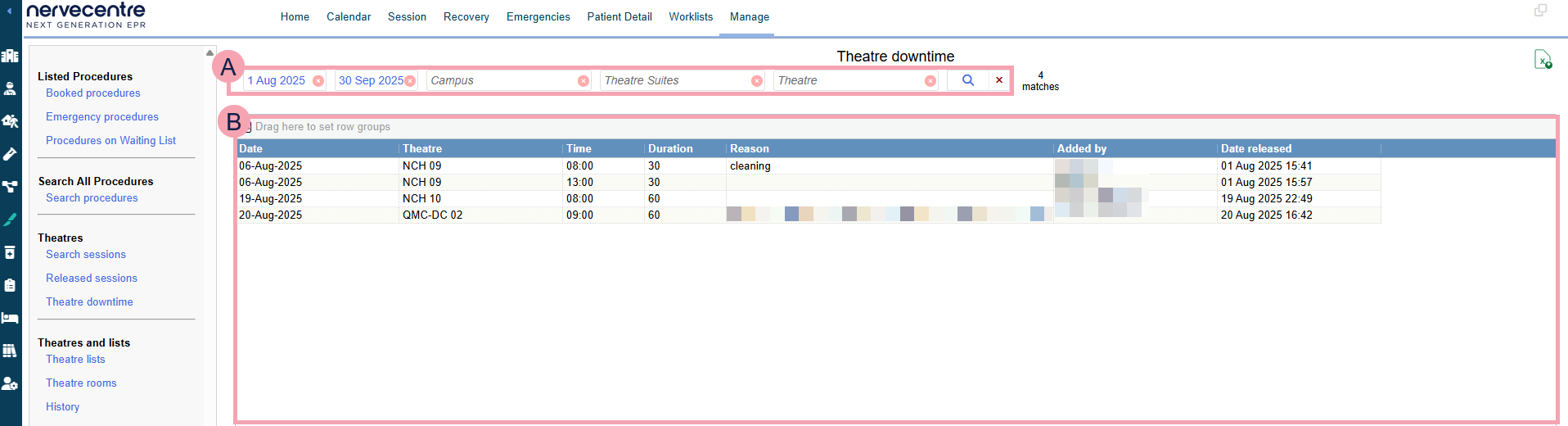
From Theatres > Manage > Theatre downtime, you can view theatre downtime.
|
|
Here you can select the criteria for your search. To clear one search term, select next to the search term. To clear your whole search, select next to . |
|
|
Select to search. |
|
|
Export the current results to an .xlsx file. |
|
|
Shows the table of data returned by your search. You can filter this table. |


 Viewing theatre downtime
-
From Theatres > Manage > Theatre downtime, select your search criteria.
Use the table below to choose your search criteria.
From
Select a date to view downtime after this date.
To
Select a date to view downtime before this date.
Campus Select a campus.
Theatre Suites
Select a theatre suite.
Theatre
Select one or more theatres.
-
Select .
A table appears.
Did you find this article helpful? Yes No
Sorry about that. Our help is a work in progress and we welcome any feedback.
Why wasn't this helpful? Please select one reason:
Great!
Thanks for taking the time to give us some feedback.