Nervecentre V9.0 Help for Users
Viewing a procedure's progress
You can view what you need to do next for a procedure from Patient Detail > Procedures > Progress. For example, if you need to add the patient to a waiting list, update the pre-op status, or complete the procedure record.
Viewing a procedure's progress on a mobile
You can't do this on a mobile.
Viewing a procedure's progress on a desktop
 Overview of Procedures > Progress
From Patient Detail > Procedures > Progress, you can view the progress of the procedure, and what you need to do next.
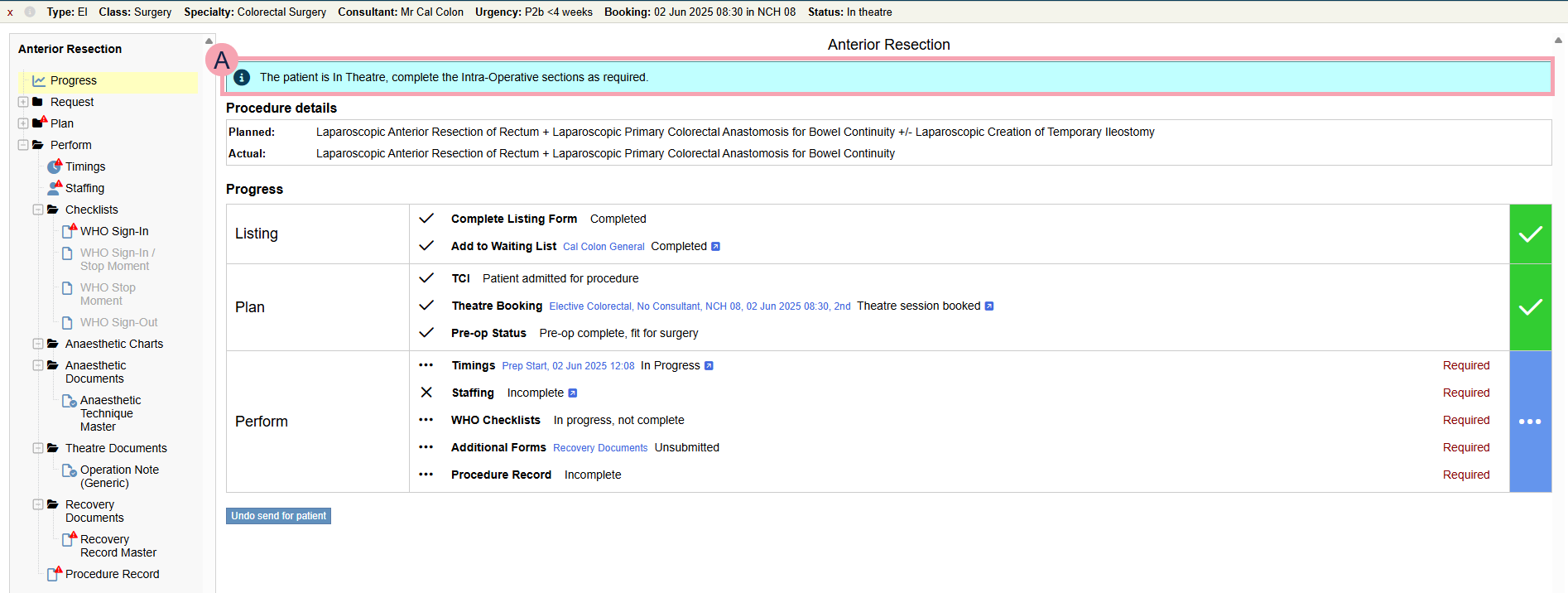
The options available to you depend on the type of procedure, and its status.
|
|
Shows what you need to do next to progress the procedure. |
|
Planned |
The procedure that was planned. For example, you planned to replace the patient's hip and not use cement. |
|
Actual |
The actual procedure performed. For example, you actually used cement when you replaced the patient's hip. |
|
Complete Listing Form |
Shows if you need to complete the listing form, or if it is completed. |
|
Add to Waiting List |
For elective procedures. Shows if you need to add the patient to a waiting list for their procedure, or if the patient is on a specific waiting list for the procedure. Select to add the patient to a waiting list, or to view the patient's waiting list entry. |
|
Add to Emergency Waiting List |
For emergency procedures. Shows if you need to add the patient to an emergency waiting list for their procedure, or if the patient is on an emergency waiting list. |
|
TCI |
Shows if the patient has a preadmission for their procedure, or if they are admitted. Select to view the patient's preadmission. |
|
Theatre Booking |
Shows if you need to make a theatre booking, or if the patient already has a theatre booking. Select to view the theatre booking. |
|
Pre-op Status |
Shows the pre-op status. |
|
Pre-op Requirements |
Shows any pre-op requirements, and if they are complete. |
|
Pre-op Appointments |
Shows any pre-op appointments. |
|
Timings |
Shows if you need to start recording timings, or if they are complete. Select to view and record timings. |
|
Staffing |
Shows if the staffing record is incomplete, or complete. Select to view and complete the staffing record. |
|
WHO Checklists |
Shows if you need to start or complete WHO safety checklists, or if they are complete. |
|
Additional Forms |
Shows if you need to submit any documents about the procedure, and if you do, the documents you need to submit. |
|
Procedure Record |
Shows if the procedure record is incomplete, or complete. |
|
Send for patient |
Select to send for the patient. |
|
Undo send for patient |
Select if you sent for the patient in error. |
|
Cancel Theatre Booking |
Select to cancel the theatre booking and add the procedure back to the waiting list. |
|
Cancel Procedure |
Select to cancel the procedure. |
|
Return to Waiting List |
Select to return the patient to a waiting list. |
|
Reopen |
Select to reopen the procedure. |
|
Finalise procedure record |
Select to finalise the procedure record. This doesn't submit the procedure record. If the procedure record isn't submitted, you can't finalise the procedure record. |

Did you find this article helpful? Yes No
Sorry about that. Our help is a work in progress and we welcome any feedback.
Why wasn't this helpful? Please select one reason:
Great!
Thanks for taking the time to give us some feedback.