Nervecentre V9.0 Help for Users
About managing outpatients
From Outpatients > Manage, you can:
-
View and edit information about your clinic
-
Add clinic resources and templates for appointment slots
-
View utilisation charts about your clinic's appointment slots
-
View your clinic's history
-
View information about patients under the care of a specific specialty
For example, all patients with referrals to Dermatology, or a Patient Tracking List (PTL) for Cardiology.
-
Perform bulk actions
For example, you can cancel multiple appointments to a waiting list.
About managing outpatients on a mobile
You can't do this on a mobile.
About managing outpatients on a desktop
 Overview of Outpatients > Manage
You can manage outpatients and clinics from Outpatients > Manage.
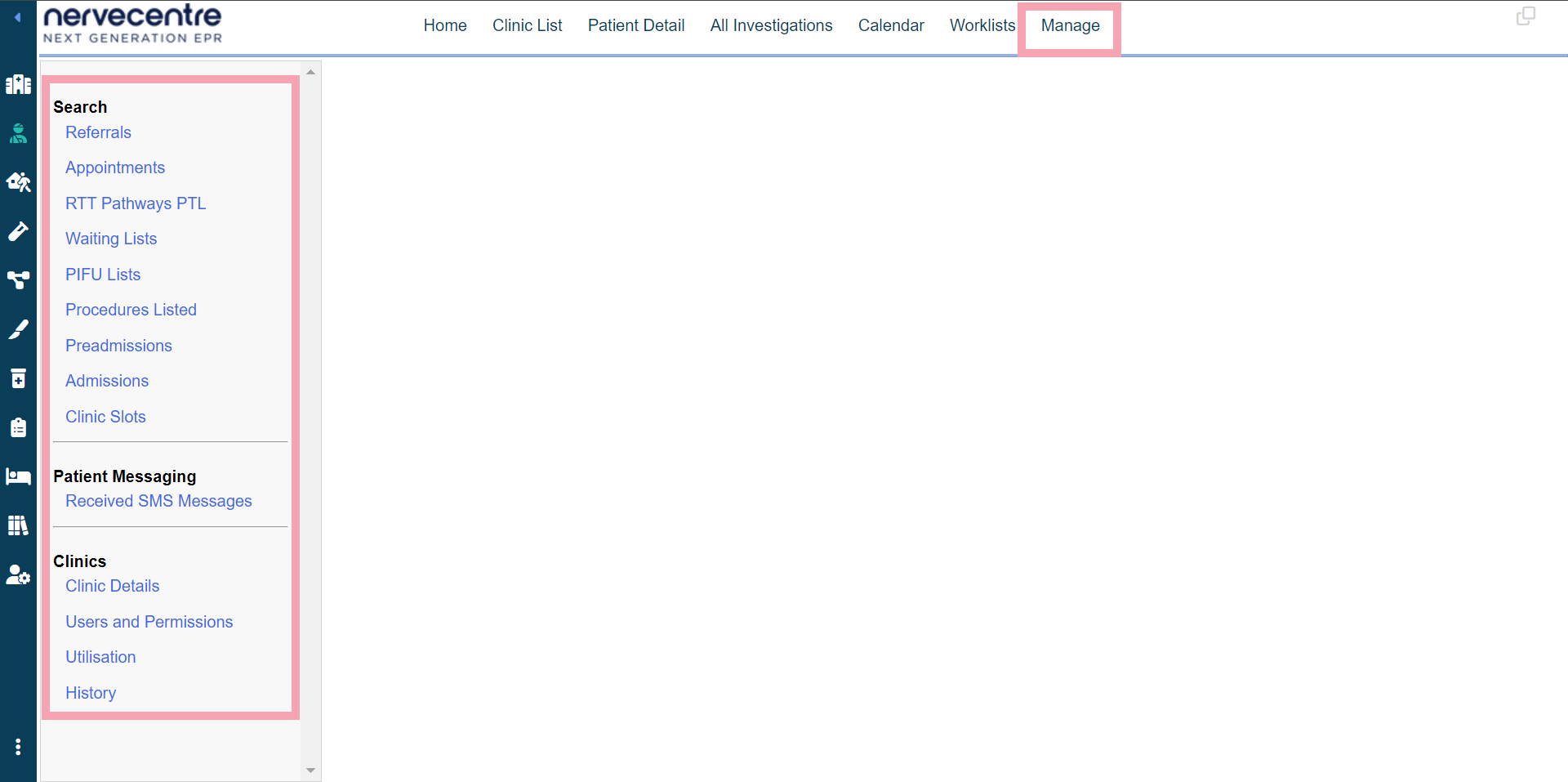
|
Referrals |
Select to view a list of referrals to a specific specialty. |
|
Appointments |
Select to view a list of appointments at your clinic. From here, you can manage multiple appointments, and send ad hoc letters. |
|
RTT Pathways PTL |
Select to view a Patient Tracking List (PTL) for a specific specialty. |
|
Waiting Lists |
Select to view a list of patients on waiting lists for a specific specialty. From here, you can transfer patients between waiting lists. |
|
PIFU Lists |
Select to view a list of patients on a PIFU Patient Initiated Follow-Up. Allows patients and their carers the flexibility to arrange their follow-up appointments as and when they need them. pathway. |
|
Procedures Listed |
Select to view a list of patients with procedures listed. From here, you can place patients on a waiting list. Read more about viewing and managing patients with listed procedures |
|
Preadmissions |
Select to view a list of patients with planned admissions during a specific time period. |
|
Admissions |
Select to view a list of patients who were admitted during a specific time period. |
|
Clinic Slots |
Select to view a list of appointment slots at your clinic. From here, you can manage multiple appointment slots. |
|
|
Select to view SMS messages from patients about their appointments. |
|
Clinic Details |
Select to view and edit details about your clinic. From here, you can add clinic resources, create templates for appointment slots, and schedule ad hoc clinics. Read more about editing your clinic's details |
|
|
Select to manage user permissions for a specific specialty and clinic. |
|
Utilisation |
Select to view a chart about your clinic's appointment slots and how they were used. Read more about viewing charts about your clinic's appointment slots |
|
History |
Select to view your clinic's history. For example, this shows who added appointment slots, or who edited a clinic resource. |
Did you find this article helpful? Yes No
Sorry about that. Our help is a work in progress and we welcome any feedback.
Why wasn't this helpful? Please select one reason:
Great!
Thanks for taking the time to give us some feedback.