Nervecentre V9.0 Help for Users
About observations for outpatients
You can record a set of observations for an outpatient in the context of their appointment. You can view these observations in a grid or table.
About observations for outpatients on a mobile
 Viewing observations for outpatients
-
Select Outpatient.
-
On iOS, you might need to select More to see Outpatient.
-
On Android, select > Outpatients.
-
-
Choose a clinic and a day to view.
-
Select the patient's appointment.
-
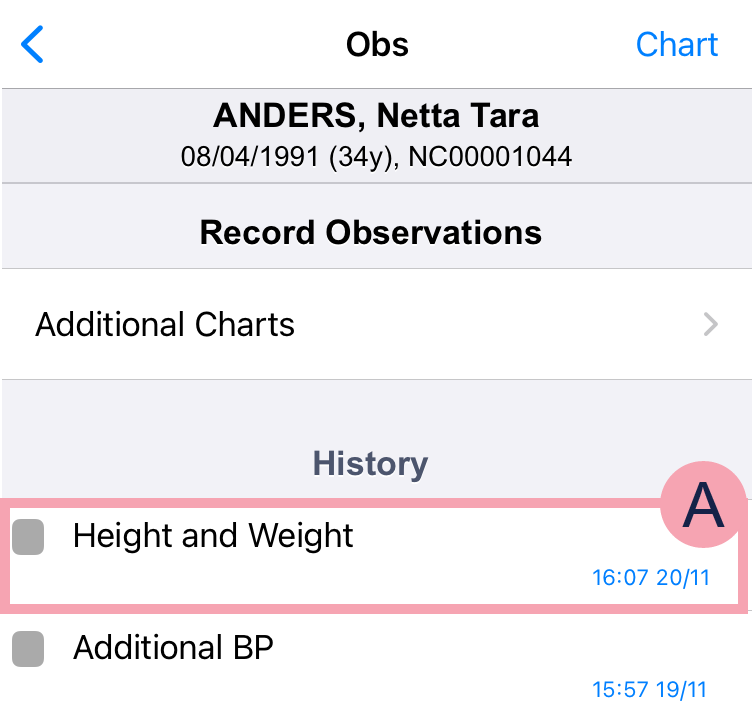
From Obs & Assessments, select Obs.
Overview of observations
|
Chart |
Select to view recorded observations in a grid. |
|
Additional Charts |
Select to record observations. |
|
History |
Shows previously recorded observations. |
|
|
Select to strike out the recorded observations. |

About observations for outpatients on a desktop
Finding observations from Outpatients
From Outpatients > Clinic List > double-click on a patient's name > Patient Detail > Clinical, find Observations.
Overview of observations for a patient
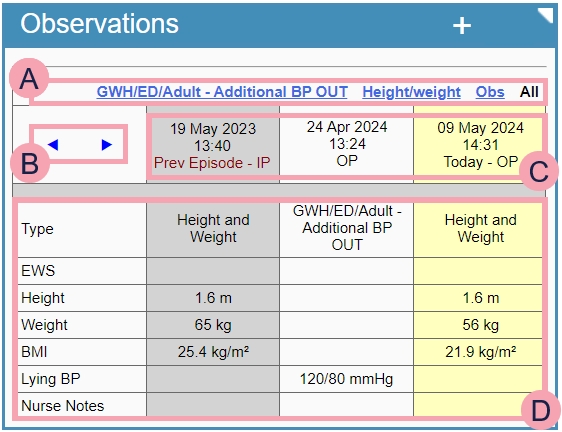
From Outpatients > Patient Detail > Clinical > Observations, you can view observations for a patient.
|
+ |
Select to record an observation. Read more about recording an observation To see +, you must select an episode of care and an appointment. Read about selecting the correct episode of care and appointment |
|
◥ |
Select to expand the chart across the width of the page. |
|
|
Select an option to view specific observations, for example, height and weight. Select All to see all observations. |
|
|
Select or to navigate backwards or forwards through submitted observations. |
|
|
Shows when the observation was recorded. The background colour depends on when the observation was recorded. If the observation was recorded:
|
|
|
Shows the observations recorded. |


Did you find this article helpful? Yes No
Sorry about that. Our help is a work in progress and we welcome any feedback.
Why wasn't this helpful? Please select one reason:
Great!
Thanks for taking the time to give us some feedback.