Nervecentre V9.0 Help for Users
Choosing a theatre session
You can choose a theatre session when you:
-
Offer a date for a procedure
-
Offer a standby date
-
Proceed with a procedure in the current visit
Read more about proceeding with a procedure in the current visit
-
Edit a theatre booking
Choosing a theatre session on a mobile
You can't do this on a mobile.
Choosing a theatre session on a desktop
 Overview of Theatre session or Standby theatre session
You can choose a theatre session when you:
-
Offer a date for a procedure, and select the field Theatre session
-
Offer a standby date, and select the field Standby theatre session
-
Proceed in the current visit, and book a theatre session
-
Edit a theatre booking for a preadmission
Depending on your organisation, the fields Theatre session and Standby theatre session might have different names.
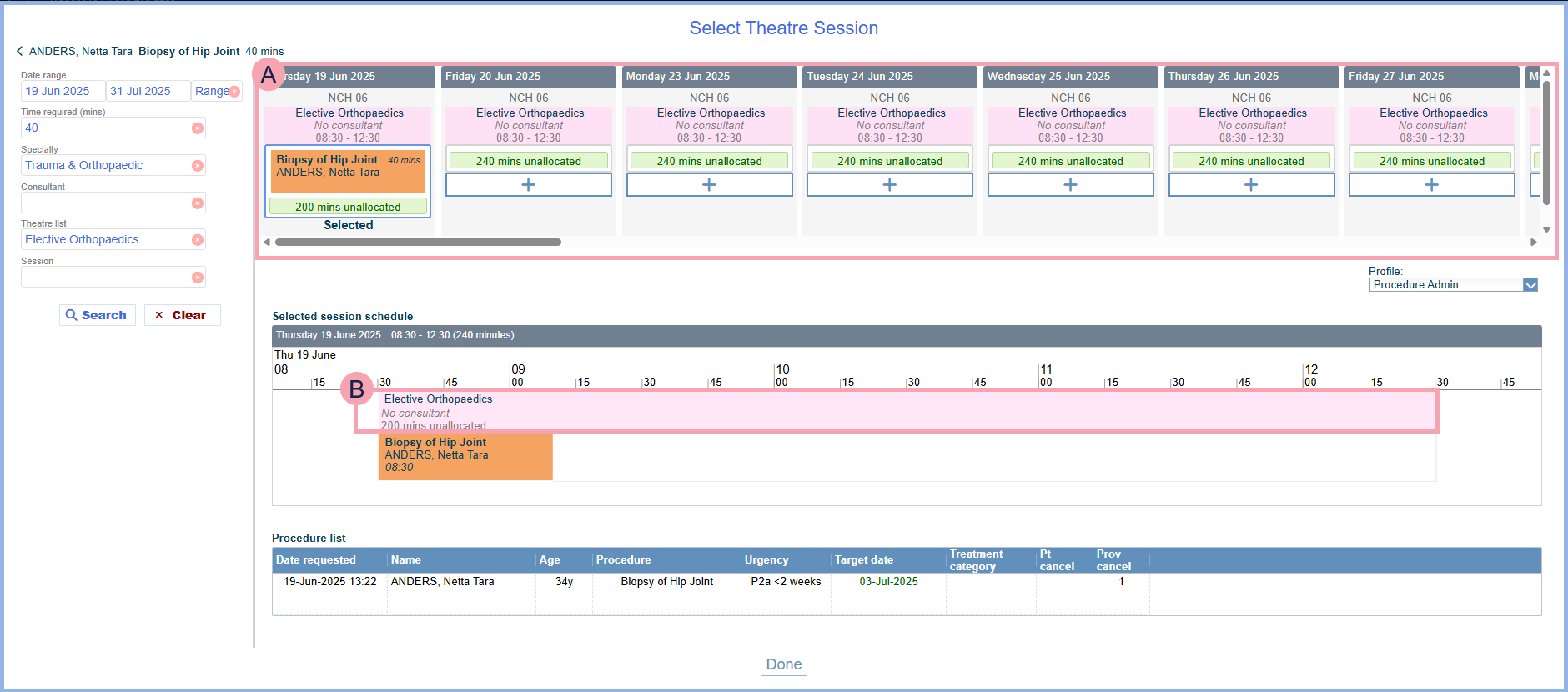
The image below shows how you can choose a theatre session.
|
Date range |
Select a date range to search for sessions in that range. |
|
Time required (mins) |
Enter the time needed for the procedure. |
|
Specialty |
Select a specialty to search for sessions for that specialty. |
|
Consultant |
Only appears if you select a specialty. Select a consultant to search for sessions with that consultant. |
|
Theatre list |
Select one or more theatre lists to view sessions for those lists. |
|
Session |
Only appears if you select a theatre list. Select a session to view that session. |
|
Search |
Select to search for sessions. |
|
Clear |
Select to clear your search criteria. |
|
|
Shows sessions you can select. Select + to add the procedure to that session. |
|
Profile |
Select a clinical note profile to change the information that displays against the patient in Procedure list. |
|
Selected session schedule |
Shows the procedure in the selected session. If there is more than one procedure in a session, you can select and drag a procedure to change the order of the procedures in the session. If you are booking a standby date for the procedure, the procedure doesn't display in the session. Instead, + n standby displays, where n is the number of procedures on standby. |
|
|
Depending on your permissions, you can manage sessions. Mouseover the session and select to:
|
|
Procedure list |
A list of procedures in the session. |
|
Done |
Select to book the procedure into the selected session. |

 Choosing a theatre session
-
Start with one of the following actions:
-
Offer a date for a procedure
-
Offer a standby date
-
Proceed with a procedure in the current visit
Read more about proceeding with a procedure in the current visit
-
Edit a theatre booking
-
-
From Date range, select when you want the theatre session to be.
-
From Time required (mins), enter the time needed for the procedure.
-
Optional: from Specialty, select a specialty.
-
Optional: from Consultant, select a consultant.
-
Optional: from Theatre list, select one or more theatre lists.
-
Optional: from Session, select a session.
-
Select Search.
-
Select + to add the procedure to a session.
-
Select Done to book the procedure into the selected session.
Did you find this article helpful? Yes No
Sorry about that. Our help is a work in progress and we welcome any feedback.
Why wasn't this helpful? Please select one reason:
Great!
Thanks for taking the time to give us some feedback.