Nervecentre V9.0 Help for Users
You can link a patient's local record with PDS Personal Demographic Service, an NHS system. PDS helps healthcare professionals to identify patients and match them to their health records. It also allows them to contact and communicate with patients. from Patient Detail > Patient admin > PDS Lookup. You can view information about the patient from PDS, and resolve differences between their local record and their record on PDS. You can recheck PDS to receive the latest information.
Linking a patient's record to PDS on a mobile
You can't do this on a mobile.
Linking a patient's record to PDS on a desktop
 Overview of PDS Lookup
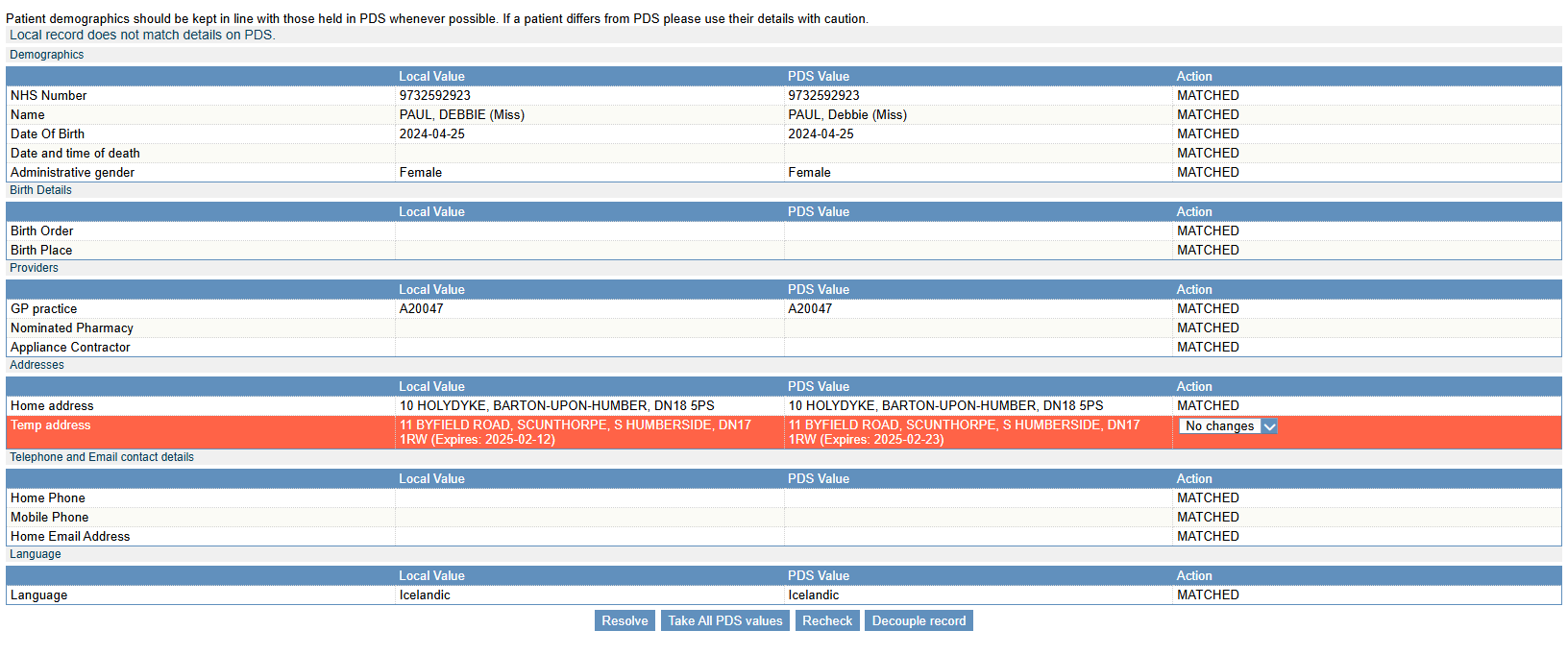
From Patient Detail > Patient admin > PDS Lookup, you can view information about a patient from PDS, and resolve differences between a patient's local record and their record on PDS.
Read about information shared between Nervecentre and PDS
|
|
If there is a difference between the two records, red text displays on the left and the difference is highlighted in yellow. Select the values you want to keep. The information you are keeping has a green border around it. |
|
Value in Nervecentre |
Shows information about the patient in the patient's local record. |
|
Value in PDS |
Shows information about the patient from PDS. |
|
|
Mouseover a selected value to see this button. Select to clear your choice. |
|
Apply changes |
Select to keep the values you have selected. |
|
Cancel |
Select to cancel the last action you did. For example, if your last action was you trying to admit the patient, this cancels admitting the patient. |
|
Clear all |
Select to clear your choices. |
| Select all PDS | Select to choose all the values in PDS. |
| Select all Nervecentre |
Select to choose all the values in the patient's local record. Some values in PDS you can't update with the values in the local record, for example, the patient's GP. |
|
Recheck |
Select to check PDS for new information about the patient. |
|
Decouple record |
Select to decouple the patient's record from PDS. |
 Linking a patient record to PDS
-
Open the patient's record.
-
From Inpatients, select Patient List > double-click on a patient's name > Patient Detail.
-
From Outpatients, select Clinic List > double-click on a patient's name > Patient Detail.
-
-
From Patient Detail > Patient admin, select PDS Lookup.
-
Select Link to PDS.
If there are no differences between a patient's local record and their record on PDS, Nervecentre updates the date and time PDS was last checked.
If there are differences between a patient's local record and their record on PDS, these differences are highlighted in yellow.
-
Choose the values you want to keep, or decouple the record from PDS.
-
To keep specific values, select those values, then select Apply changes.
If you are updating PDS with values on the local record, log in with your NHS Care Identity credentials.
-
To update all the values in the local record with the values in PDS, select Select all PDS > Apply changes.
You must then log in with your NHS Care Identity credentials.
-
To update all values in PDS with the values in the local record, select Select all Nervecentre > Apply changes.
Some values in PDS you can't update with the values in the local record, for example, the patient's GP.
-
To check PDS for new information, select Recheck.
-
To decouple the local record from the record on PDS, select Decouple record.
Nervecentre updates the status of the patient's local record, and the date and time PDS was last checked.
-
Viewing a patient's record on PDS
-
Open the patient's record.
-
From Inpatients, select Patient List > double-click on a patient's name > Patient Detail.
-
From Outpatients, select Clinic List > double-click on a patient's name > Patient Detail.
-
-
From Patient Detail > Patient admin, select PDS Lookup.
A table appears that shows the information in the patient's local record, and their record on PDS.
Resolving differences between a patient's local record and PDS record
-
Open the patient's record.
-
From Inpatients, select Patient List > double-click on a patient's name > Patient Detail.
-
From Outpatients, select Clinic List > double-click on a patient's name > Patient Detail.
-
-
From Patient Detail > Patient admin, select PDS Lookup.
If there are differences between a patient's local record and their record on PDS, these differences are highlighted in yellow.
-
Choose the values you want to keep.
-
To keep specific values, select those values.
-
To update all the values in the local record with the values in PDS, select Select all PDS.
-
To update all values in PDS with the values in the local record, select Select all Nervecentre.
Some values in PDS you can't update with the values in the local record, for example, the patient's GP.
-
-
Select Apply changes.
-
If you are updating PDS with values on the local record, log in with your NHS Care Identity credentials.
-
If you have more than one role associated with your Care Identity account, select the most suitable role.
Did you find this article helpful? Yes No
Sorry about that. Our help is a work in progress and we welcome any feedback.
Why wasn't this helpful? Please select one reason:
Great!
Thanks for taking the time to give us some feedback.