Nervecentre V7.2 Help for Users
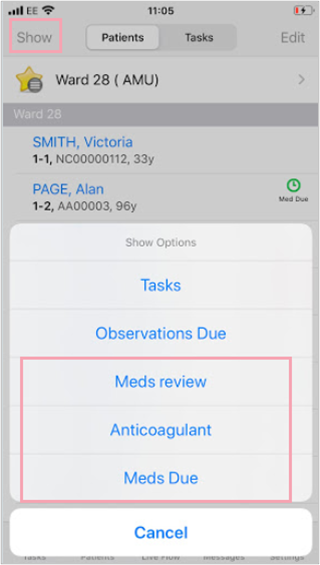
You can choose what extra information you want to see on your patient list from Show. The options you see depend on your organisation. Possible options include Meds review, Anticoagulant, and Meds Due.
 Selecting what information to show
-
From Patient list > select Show.
-
Select options, in this case: Meds review, Anticoagulant, and Meds Due.
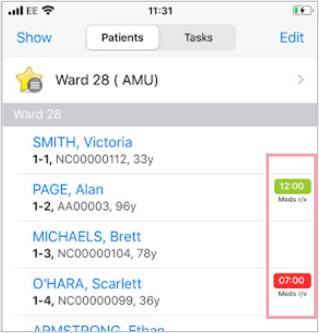
About Meds Review
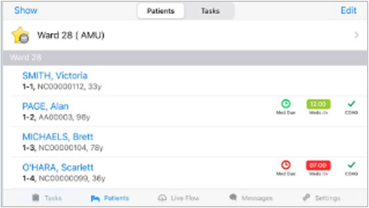
Any prescriptions that contain an upcoming soft or hard review are shown. If the review is due soon, the review time is shown in a green icon. If the review is overdue, the review time is shown in red.
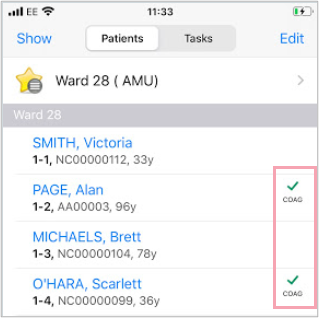
About Anticoagulant
If the patient is prescribed an anticoagulant, a green tick and COAG are displayed.
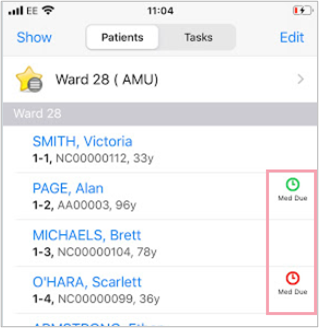
About Meds Due
If the patient has a prescription with a due dose, a green clock is displayed. If the patient has a prescription with an overdue or missed dose, a red clock is displayed.
Viewing more information in landscape view
Turn the mobile into landscape position to see the last three options you selected, in this case: Meds review, Anticoagulant, and Meds Due.
Did you find this article helpful? Yes No
Sorry about that. Our help is a work in progress and we welcome any feedback.
Why wasn't this helpful? Please select one reason:
Thanks for your feedback.
Great!
Thanks for taking the time to give us some feedback.